
Software innovation since 2011.
Mobile App
Version Control,
Native to Salesforce.
When a user logs a ticket, your support team shouldn't have to ask "what version are you on?" AppAscend tells you instantly, shows how every release is being adopted, forces the upgrade when a fix is critical, and broadcasts maintenance or release notices to every active install — all from inside Salesforce.
Why AppAscend
Three questions every mobile app team keeps answering. AppAscend answers them once.
Built for enterprises running Salesforce-connected mobile apps — where every old version in the wild becomes a support ticket, a stuck rollout, or a missed comms moment.
"What version is the user on?"
When a ticket lands, your support team shouldn't have to ask. AppAscend records the exact iOS or Android build every user is running — right next to their Salesforce record. Debug from facts, not from screenshots.
"Has the upgrade actually rolled out?"
Shipping a release doesn't mean users installed it. AppAscend shows live adoption across iOS and Android so you see exactly who is on the new build — and force the laggards when the fix is critical. Fewer tickets against bugs you've already fixed.
"How do we reach every user right now?"
Maintenance this weekend? A new release dropping Monday? Need everyone to sync before a cutover? Push an alert, banner or full-screen sheet to every active install — no app-store release required, no email blast ignored.
In the package
What ships with AppAscend.
A managed package for Salesforce, a Lightning admin console, native iOS & Android SDKs, and a REST endpoint that ties them together.
Version & user inventory
Every install reports its build number, OS version, and last-seen timestamp into a Salesforce object — queryable with SOQL, reportable in dashboards, and addressable from Flow.
Three native message types
Compose once in Salesforce, target by app version, schedule with start and end dates. Renders as a native alert, banner, or bottom sheet on the next launch.
Per-version upgrade policy
Each version record has a Force and an Optional toggle. Force shows a blocking screen until the user updates; optional shows a dismissible prompt. Change either at any time.
Adoption dashboard
Live donut charts for version distribution and active vs. inactive users, scoped per app. Click a slice to drill into the underlying user list — searchable and filterable by platform.
Salesforce managed package
Installed from a single AppExchange-style link. Inherits your sharing model, permission sets, and audit log. No new login, no separate database, no middleware to operate.
Native iOS & Android SDKs
Swift / Objective-C and Kotlin / Java SDKs. One initialiser line in your launch sequence calls a single REST endpoint — fetches policy, fetches messages, renders the right UI.
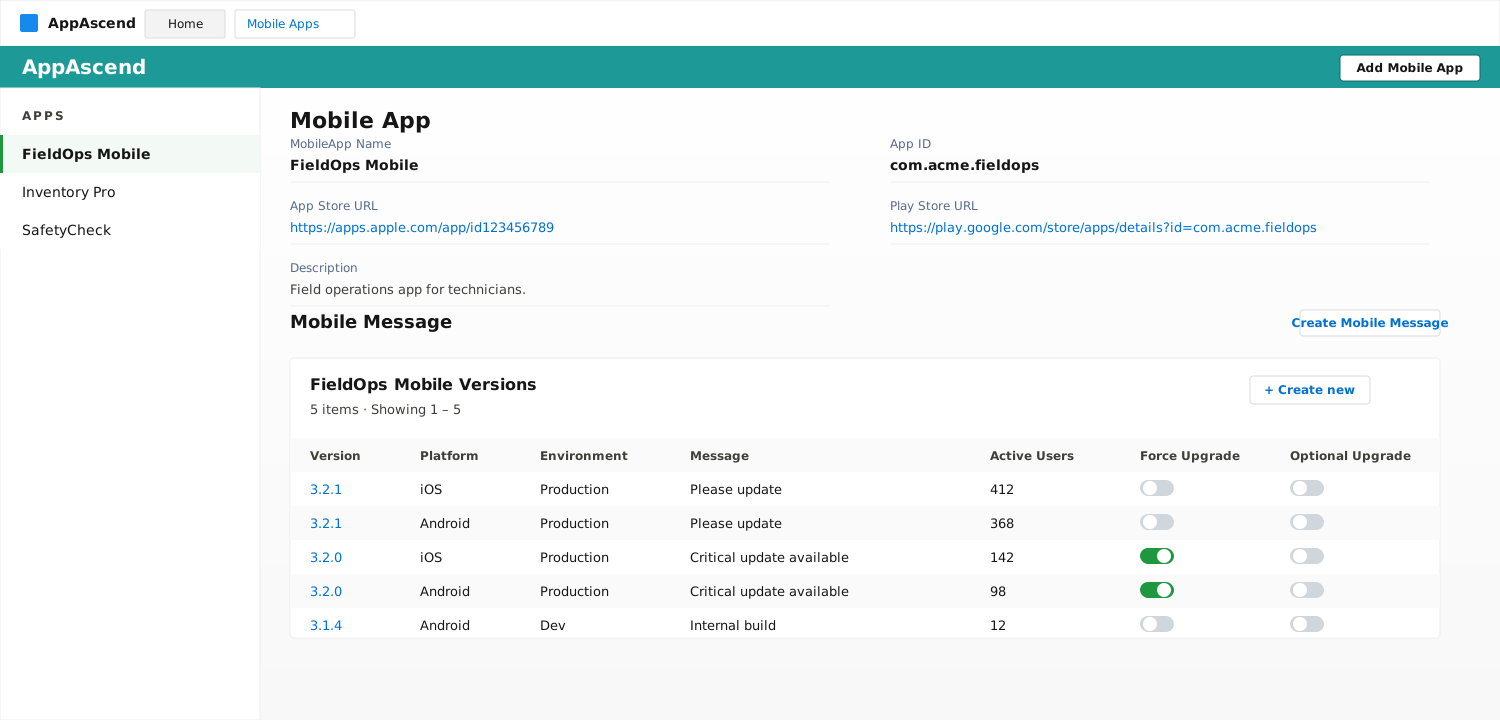
Manage versions
Every version. Every platform. One screen.
A single record per app, with all its versions ranked by adoption. Toggle Force Upgrade or Optional Upgrade per version — changes apply instantly the next time the user opens the app.
- Per-version active user counts
- Environment filters (Dev, Production)
- iOS and Android in the same view
In-app messaging
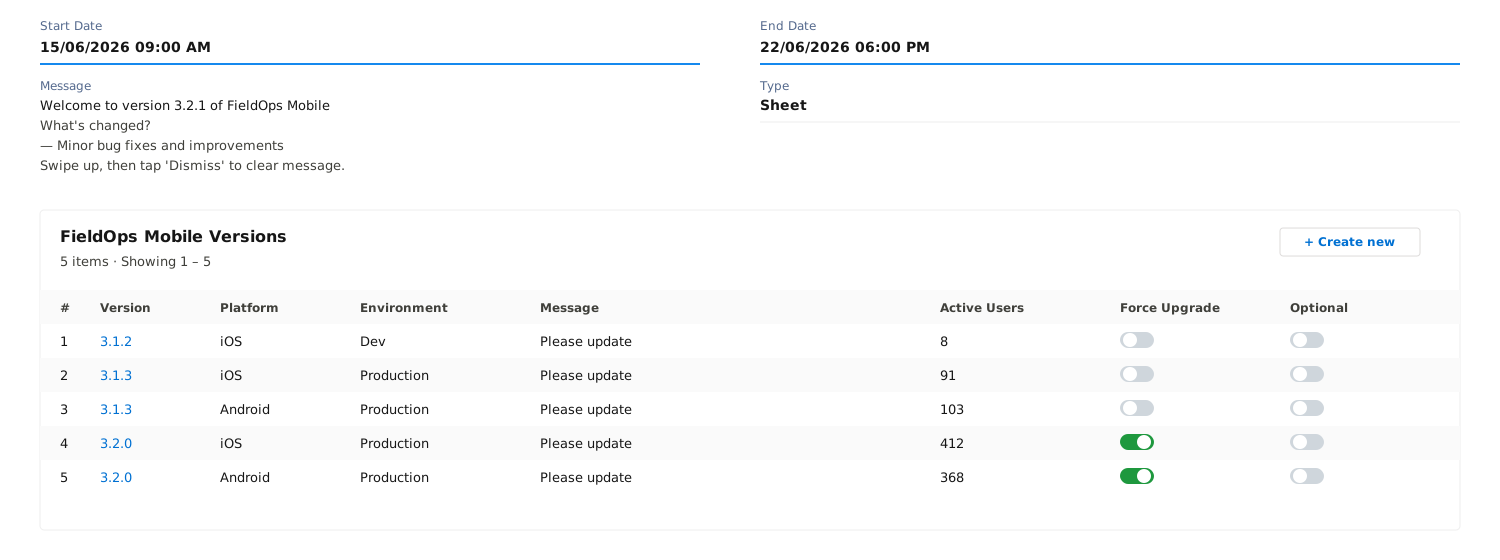
Talk to your users without shipping a release.
Compose an alert, banner, or full-screen sheet from Salesforce. Schedule it, target a version, and your users see it on the next app launch.
- Alert — modal dialog for critical comms
- Banner — non-blocking top-bar message
- Sheet — rich bottom-sheet with release notes
Adoption analytics
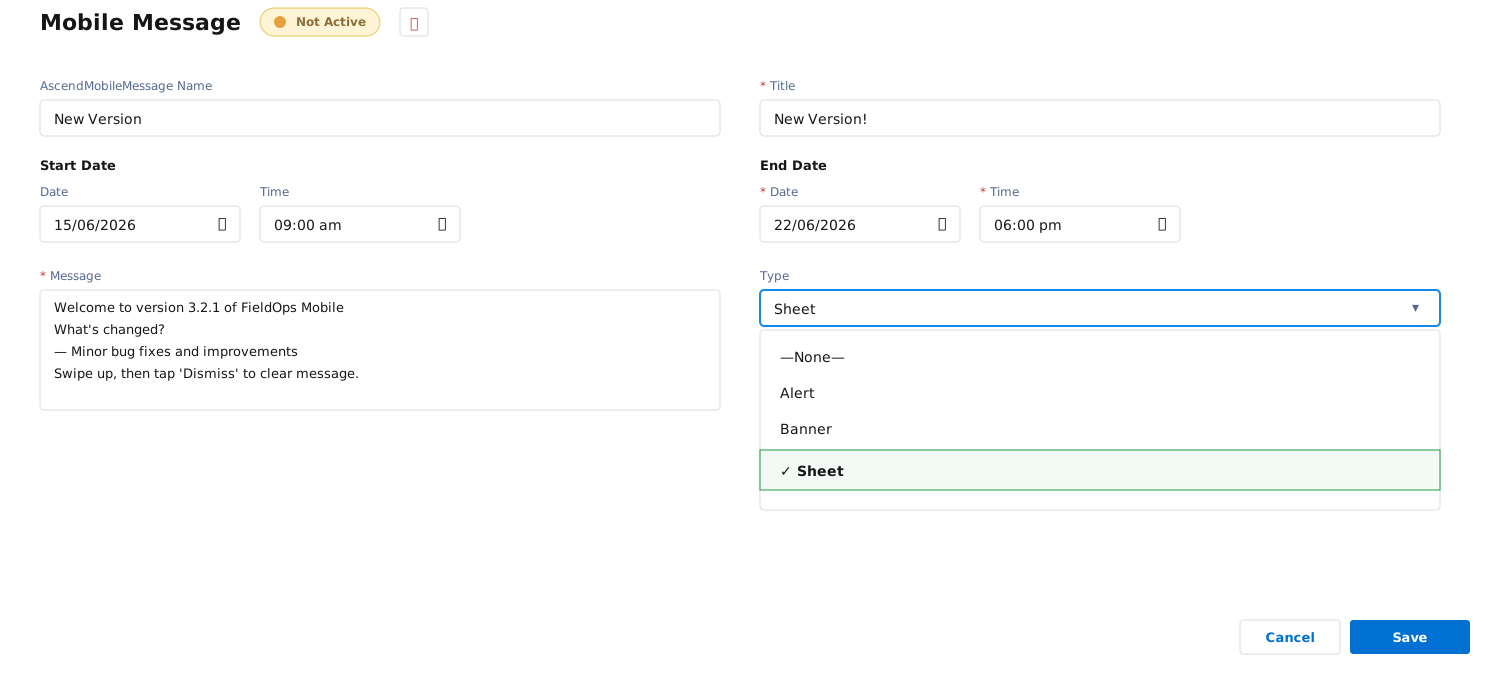
See adoption before it becomes a support ticket.
Donut charts surface version fragmentation and active-user share in real time. Identify the long tail of outdated installs and act before it costs you support hours.
- Version distribution donut
- Active vs inactive user split
- Per-version user drill-down
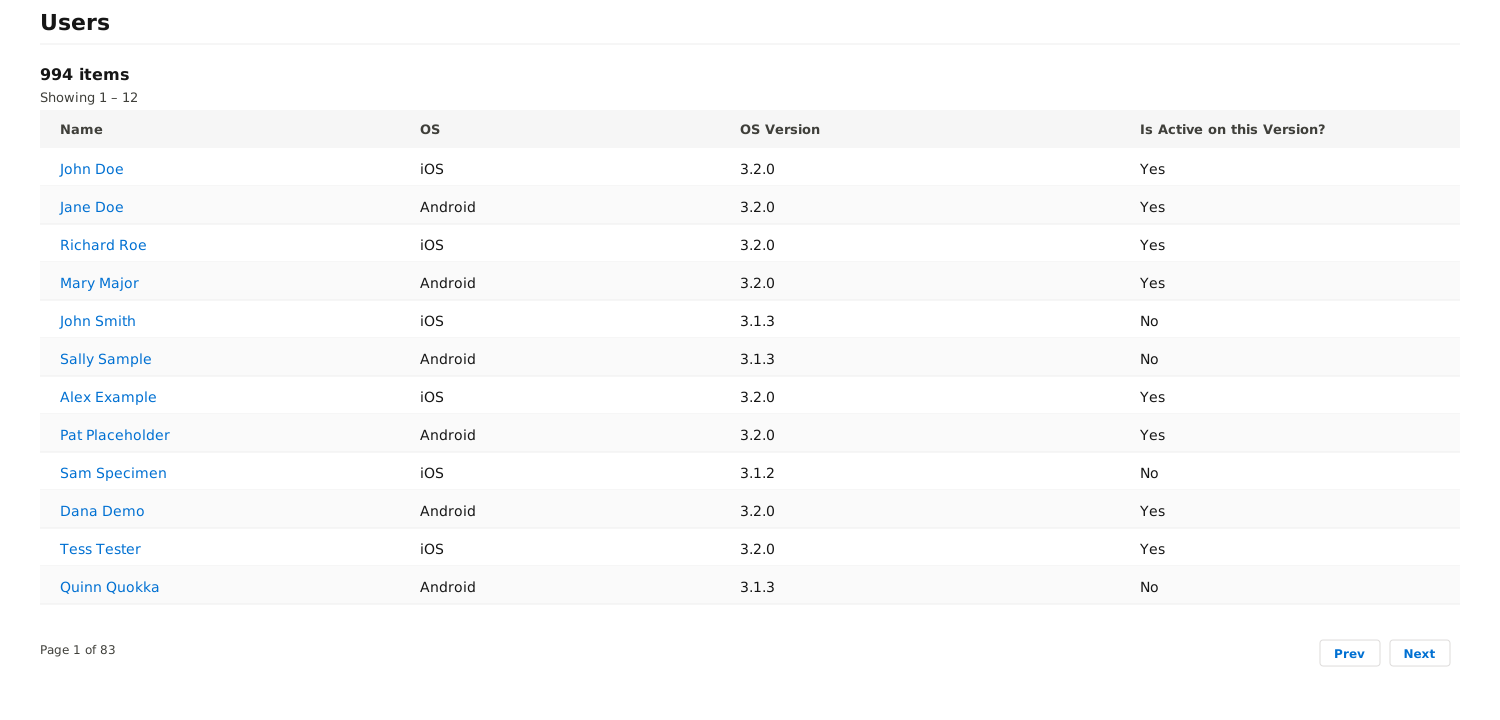
User drill-down
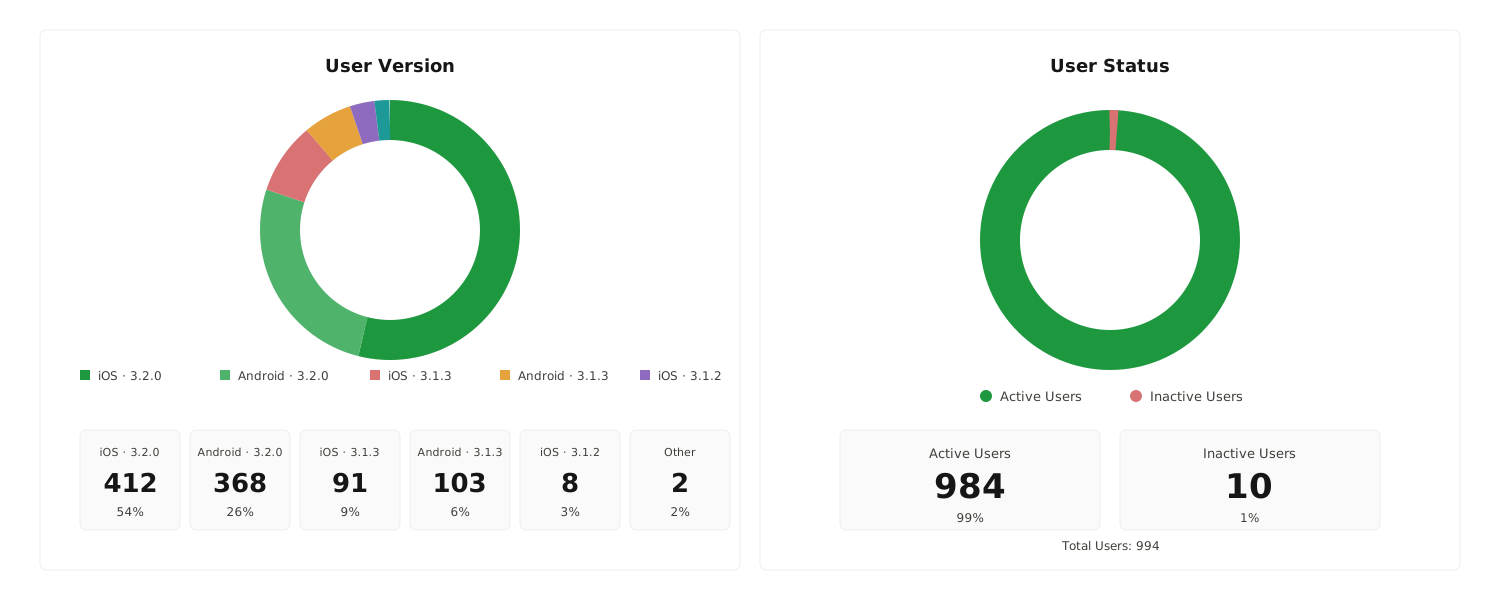
Know exactly who is on which version.
Click any version and see the people on it — name, platform, OS version, and whether they're active on the current build. No guesswork, no exports.
- Searchable user table per version
- iOS and Android side-by-side
- Active / inactive flag per user
App integration
Drops into iOS and Android in an afternoon.
A lightweight SDK on the mobile side calls our REST endpoint on the Salesforce side. That's it. No middleware, no new infrastructure.
iOS
Swift & Objective-C SDK. Hooks into your AppDelegate or SceneDelegate on launch, fetches your active messages and version policy from Salesforce, and renders native alerts, banners or sheets.
Android
Kotlin & Java SDK. Same lightweight check-in pattern — initialise in Application.onCreate, read message and version state, render with native dialogs and bottom sheets.
How it works
Four steps from install to insight.
Install in Salesforce
Drop AppAscend into your org as a managed package. Assign the permission set and you're ready.
Register your app
Create a Mobile App record with your iOS App Store and Google Play URLs and your app ID.
Embed the SDK
Add the lightweight iOS / Android SDK to your mobile build — one line in your launch sequence.
Manage from Salesforce
Push messages, flag versions for forced upgrade, and watch adoption from the AppAscend Lightning page.
AppAscend turns mobile app lifecycle management into a Salesforce object — which means the same team that manages your accounts can now manage your app rollout, your release messaging, and your upgrade policy. — Built by UiRev · Software innovation since 2011.
Get AppAscend
Ready to run AppAscend on your apps?
Tell us a little about your apps and your Salesforce org. We'll get back to you within one business day with next steps — installation, pricing, and an SDK starter.
-
Email
info@uirev.com -
Documentation
AppAscend Customer Docs -
Built by UiRev
Software innovation since 2011.